List of articles in this page

August 31, 2012

What's New on MyStats V1.23


The latest version of MyStats has been released. Many new features are now available!

Let's take a look at them!


1. Twitter Integration

Not only to Facebook and Evernote, you can now post your analysis and comments to Twitter directly!

There is a new "Tweet" button.

You can write up to 118 characters excluding the URL of the analysis picture. An official Hash tag is also available.

After checking the preview, tap on the "Tweet" button.


Here it is.


Why don't you tweet your dream or goal and charts letting your friends know how you are doing?
   

2. My Memo

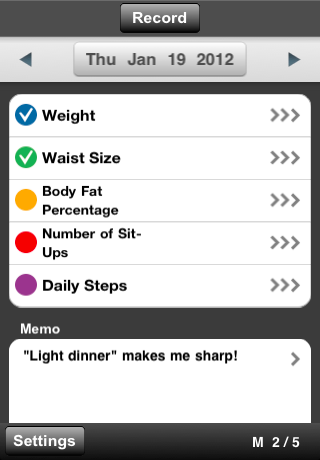
You can write a memo on the Daily Activity Record screen.

Before, those memos could only be seen on this daily screen, but not anymore. You now have a new "My Memo" screen and can see all of the memos you wrote together.

On the Analyze menu screen, there is a new "My Memo" button and it'll take you there.


It's especially for those of who write a quick journal on MyStats. If you are not, how about trying it?

3. Start Month for the Annual Line Graph

There is a new option in the Line Graph Settings screen.


Before, when you opened the 1 year Line Graph, it always showed last 12 months.


However, if you've set an annual goal at the beginning of the year, what you'd like to see is a Line Graph which starts from January.

In this case, you set January as the Start Month for 1 Year. Then you'll always see the Line Graph starting from January.


If you've set an annual goal for your school year, you can set your graph to start from September. Or you still can choose Last 12 Months to let MyStats work just as it's been.

We believe that your annual goal management is now a lot easier;)
There are some other minor changes and improvements.

Do you like V1.23? We hope so!


S.S.
lifelog, time management, self-management
Self-Management, Time Management, Productivity, GTD... MyStats
Available on the App Store (For FREE!)

May 8, 2012

Accessing The Timeline Screen Directly From Bird's-Eye View

For V1.20, we have added shortcut buttons. With these buttons you can go back and forth between recording and analyzing screens.

After releasing this feature, we received comments from users saying that they also want to access the Timeline screen from the Bird's-Eye View screen directly.

Actually there is not a shortcut button on the Bird'-Eye View, but there is a way.

On the Bird's-Eye View, double tap anywhere you want to dive into.


Now you are at the Timeline screen.

Did you know this?

This is a have-to-know feature, especially to those who use the Bird's-Eye View as their main screen. Give it a try!
S.S.

lifelog, time management, self-management
Self-Management, Time Management, Productivity, GTD... MyStats
Available on the App Store (For FREE!)

April 10, 2012

How To Change The Time Range of A Recorded Activity Easily


Have you ever changed the time range of a recorded Timed Activity?

It used to be that you had to open the Timed Activity Recording screen through the Timeline screen.

Since V1.14, you can change the time range just by dragging records on the Timeline screen. Did you know this?

It's a very easy operation.

1. On the Timeline screen, touch a recorded Timed Activity and wait a moment until the record is bordered by a red line.


2. Slide your finger and change the time range as you wish.


3. Remove your finger and the red line disappears.


With this operation, you can change the time range simply.
Give it a try!
S.S.


lifelog, time management, self-management
Self-Management, Time Management, Productivity, GTD... MyStats
Available on the App Store (For FREE!)

January 19, 2012

What's New on MyStats V1.20

The latest version of MyStats was called V1.16, but since this version has a lot of new features, we decided to call it V1.20.

Here is the list of the new features!


1. Shortcuts
You can now move between Record and Analyze screens back and forth. On the Timeline screen, there is a new "Analyze" button on the top. You can now directly move to the Pie Chart screen by tapping this button.


When you go to the Pie Chart screen from the Analyze menu, you'll see "Record" button there, too.

For the Daily Activity function, we've also added "Analyze" and "Record" buttons. On the Daily Activity Record screen, when you tap on the "Analyze" button, you'll see some changes on the screen. You can now move to any Line Graph screen directly by tapping any Daily Activity.


When you go to the Line Graph screen from the Analyze menu, you'll see something even cooler. When you tap the "Record" button on the Line Graph screen, you will have a list of records of this Daily Activity.


If you happened to miss a day of recording, you can now find it and input your value much easily.


2. Expanded Timeline
Have you ever wanted to record a Timed Activity which starts before midnight and ends after midnight? The Timeline screen of MyStats was limited to display only 0 o'clock to midnight, which you could not record Activities that went past midnight. Some users didn't like this, so we rebuilt the Timeline screen entirely.


On the new Timeline screen, when you come to the end of the day, you'll see "Tomorrow". It's endless. You can scroll on through to the next day, and the next day, and the next day. And of course, you can now record your Activities on through and past midnight.


3. Dream or Goal for each Line Graph
You may have thought that your Dream or Goal fits on your Pie Chart and some of your Line Graphs, but it doesn't fit on other Line Graphs. At least, I have.


So we decided to add "My Dream or Goal" on the settings screen of each Line graph. If you specify your Dream or Goal for a Line Graph, it will be displayed on the Line Graph screen instead of the Dream or Goal that you specified in the General Settings page.


4. Pie chart with Non-Recorded time
Some users want to see the Pie Chart with all time displayed. MyStats used to show you the Pie Chart with only recorded hours. For example, when you have "Day" for the Time Range, and you have 12 hours recorded for that day, your Pie Chart will display only 12 hours as a whole. Therefore, you could see the ratio of each Activity within 12 hours, but you could not see it within 24 hours unless you fill the whole day with records.


On MyStats V1.20, you have a new setting called "Non-Recorded Time" on the setting screen of the Pie Chart. You can choose either "Ignore on the Pie Chart and Summary" as it has been, or "Include on the Pie Chart and Summary" as a new option.

I believe some users just don't need this new feature and some really do.


5. Notification List
Let's say a message pops up on your screen and you tap the Close button immediately without reading the message. After the message disappears, you start thinking you might have missed some useful information. Have you ever had this kind of experience? Again, I have.


So we added Notification List on the Help & Contacts menu. You can now check recently closed messages here.


How is it? Do you think you will like V1.20? We hope you will love it!

There are some other minor changes and improvements such as a better look for the Help menu, etc. At the end of this blog article, we'd like to tell you one more thing.

NOTE:
Since MyStats V1.20 has a lot of new features, we had to change the internal structure and data format. Therefore, when you open MyStats after updating to V1.20, data conversion will be processed. There will be instructions on the screen, but just to let you know in advance, here they are:

- This data conversion takes 30 seconds to 2 minutes depending on the amount of data recorded.
- If you close MyStats or open other apps during this process, data conversion is resumed and will be restarted when you reopen MyStats.

That's it for now. Have fun with MyStats V1.20. It'll be coming soon!

lifelog, time management, self-management
Self-Management, Time Management, Productivity, GTD... MyStats
Available on the App Store (For FREE!)

November 5, 2011

24 Colors of MyStats

Have you tried the new colors of MyStats? Originally, there were only 12 colors in MyStats but from Version 1.12, we have doubled the number of colors, and now there are 24.

Since "More Colors" was one of the most popular requests from users, I'm guessing that these additional colors may have been welcomed by many.

By the way, did you know that these 24 colors consist of 4 groups of colors? Each group has 6 colors and each color has been modified to each group separately.


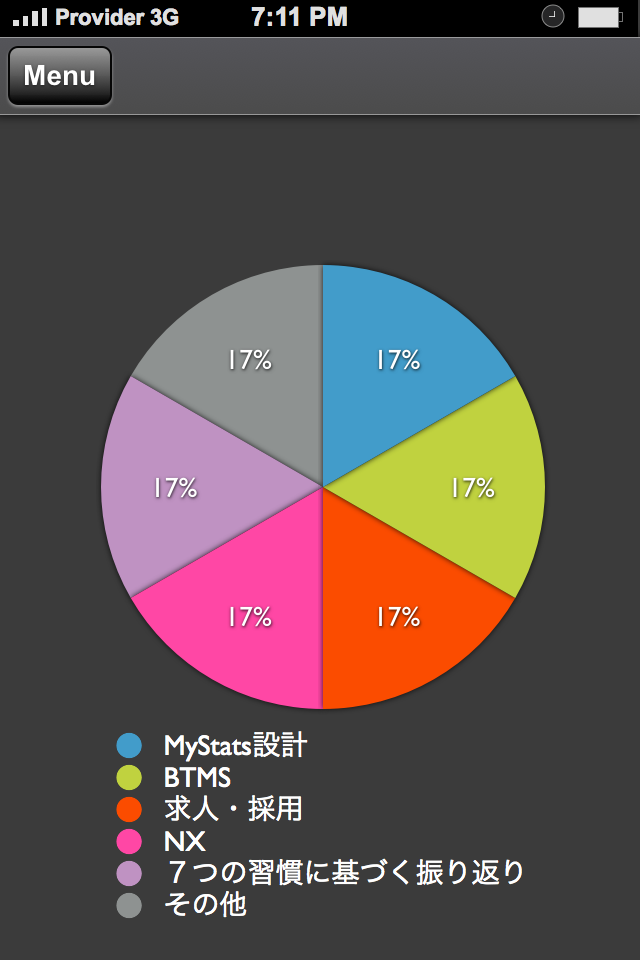
Each group looks like these on the Pie Charts.


I think that knowing this concept may help you to select colors.


Of course you can use those colors all together at once like below;-)


To tell you the truth, I don't think the current Color Select Screen design is best suited for this grouping concept. So we are planning to redesign the screen sometime in the future.

Anyway, please play around with those new colors and find your own prefered combination of colors.

lifelog, time management, self-management
Time Management, Productivity, GTD... MyStats
Available on the App Store (For FREE!)

October 15, 2011

Unit Expression, "kB"

Have you ever tried the Email CSV Data function? It's a new function and it's on the General Settings & Tools menu. When you create a csv file with this function, you will see a message like the one below.


During the design process, I saw this message and felt that there was something funny about the unit expression "kB". I thought it should be "KB" or "kb". So I asked one of our engineers who wrote that message.

His answer was that it should be "kB" according to "SI". He explained that SI stands for "Systeme International d'unites"(in English, "International System of Units"), and it's the world's most widely used system of measurement.

According to SI, the prefix for 1,000 is "k" and "K" is for Kelvin. In the same manner, "b" stands for bit and "B" is for byte. Therefore, "kilobytes" should be written "kB".

I understood what he said but he continued his explanation and asked me, "if most of the users would think that "kB" looks funny and should be "KB", should we go with "KB"?"

I replied that we should go with "kB" because he really wanted to be accurate about it and I liked it.

Though you might think that it's a tiny thing and it wouldn't really matter, I take this seriously and I am personally proud of it. Because I believe that this way of thinking makes the quality of application a lot better.

By the way, the engineer I talked about graduated school and joined us this Spring. Though he is fresh out of school, he already works like an experienced engineer. We have many engineers like him in our company, and I consider myself very lucky to work with them.

lifelog, time management, self-management
Time Management, Productivity, GTD... MyStats
Available on the App Store (For FREE!)


October 1, 2011

A Self-Management Competition, "Master of Self-Management"


Now we are holding a self-management competition, called "Master of Self-Management" in Japan.

In this competition, contestants apply and tell us how they are managing themselves with MyStats. The judge committee will select four individuals as Masters of Self-Management. Those masters will be gathered at Apple Store Ginza in Tokyo this December. It's going to be a talk event. In this event, masters will display their methods and techniques for their own self-managements, and one of them will be selected as the Great Master of Self-Management.

The prize for the Great Master is a MacBook Air. The winner will also receive a chance to be in newspapers, magazines, news sites and so on.

To be a contestant, there are very little conditions. There are no conditions on nationality, gender, age, occupation, etc. Only if you can manage yourself with MyStats very well, you can be selected as the Master.

However, if you are selected, you have to come to Tokyo for the talk event on your own. Therefore, if you are not living in Japan, it could be difficult to participate in this competition.

In the future, although I don't know when it will be, I want to hold similar competitions not only in one country but in multiple countries throughout the world. In future competitions, we will pay travel expenses for selected masters and we will gather them in places like San Francisco, London, Cologne, Beijing, Mumbai, Cape Town, or Cayman Islands.

My dream is that one day, a ticket will be delivered to somebody who has been trying things very hard and is very good at self-management. He or she is not wealthy nor famous at all, but the ticket will open a door and that person will walk through it, take a chance, and make great achievements.

If you can come to Tokyo, be a contestant. If you cannot, but are still interested, tell us where you live and let's think about how we can hold the competition in your country.

Let's one day hold the International Self-Management Competition, together.


Kenji Komai
Executive Vice President
NEOREX Co., Ltd.


(Japanese Only)


lifelog, time management, self-management
Time Management, Productivity, GTD... MyStats
Available on the App Store (For FREE!)